Excel 2 RDF Converter documentation
General Documentation
What is this tool ?
This is an Excel-to-RDF converter. It can generate RDF files from Excel or ODS spreadsheets structured in a specific way, and contains specific features for SKOS.
Using the same Excel spreadsheet structure, it is possible to produce any RDF, not only SKOS (lists of foaf:Person, of schema:Event, SHACL, OWL, etc.)
This converter does not require any configuration file to work, only the Excel document to convert.
Can I convert any Excel file in RDF ?
No. The spreadsheet has to follow the specific structure described below.
Is ODS supported ?
Yes.
Is Google Sheets supported ?
Yes, if publicly available. Add /export?format=xlsx at end the of URL to get the Excel variant of the file, and use this URL as input for the converter.
What should the Excel file look like ?
Start by downloading and looking at one of the provided examples in the SKOS-Play form. You can start from one of these files and adapt it. Look at the documentation below for an explanation on the expected spreadsheet format.
Does it really work ?
We use this tool in our daily work with RDF, OWL, SHACL, SKOS, DCAT and more. We can tell you it works, and it works fine. Our clients use it, too, and they like it. I am not far from thinking it is actually the best out there. Ho, and it costs 0, is open-source on Github, and comes with a command-line version.
Spreadsheet structure
Your spreadsheet MUST follow the structure described below to be converted to RDF. Otherwise you will get an exception or an empty RDF file. Download and look at the examples included in the conversion form.
Spreadsheet processing
Your file can contain any number of sheets. All the sheets are processed, and the extractor attempts to convert RDF from all of them. If the structure of a sheet doesn't correspond to the expected template, the converter simply moves to the next one.
Sheet header processing
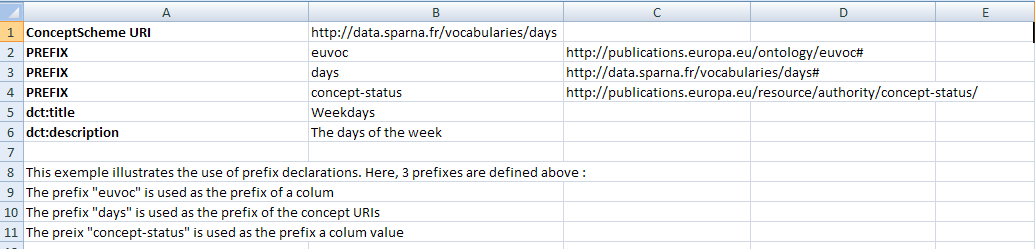
ConceptScheme URI : To be converted to RDF, a sheet MUST contain a URI in cell B1. This is interpreted as the URI of askos:ConceptScheme, and more generally
at the URI of the named graph that will contain the generated RDF.
ConceptScheme metadata : The header CAN contain descriptive metadata of the ConceptScheme, by specifying a property URI in column A, either using a declared prefix
(e.g. dct:title, see below) or as a full URI (starting with 'http');
Prefix declaration : Prefixes can be declared in the header :
- column A contains the special keyword "PREFIX" (case-insensitive) or "@prefix"
- column B contains the prefix
- column C contains the URI to be prefixed
- column A contains the special keyword "BASE" (case-insensitive) or "@base"
- column B contains the corresponding base IRI
Sheet body processing
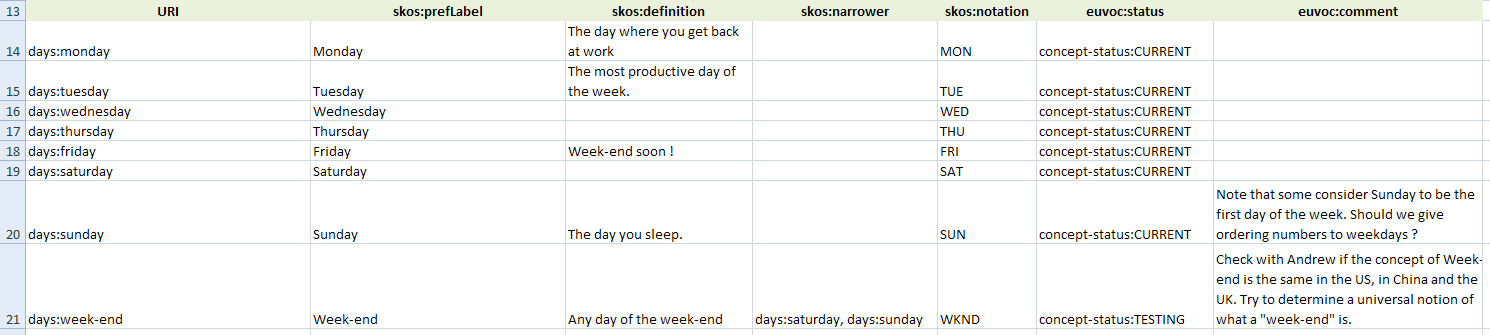
Title row : The body MUST start by a row that declares the property corresponding to each column (e.g.skos:prefLabel, skos:definition), except column A,
that will contain the URI for each resource being generated.
This is how a typical title row can look like :
 Line : Each line after the title row generates one resource with the URI read from column A. The column A MUST contain the URI of a resource, either as a
full URI (starting with 'http'), or using a declared prefix.
Cell : Each cell in a line is processed, and the value is converted to a literal or object property :
Line : Each line after the title row generates one resource with the URI read from column A. The column A MUST contain the URI of a resource, either as a
full URI (starting with 'http'), or using a declared prefix.
Cell : Each cell in a line is processed, and the value is converted to a literal or object property :
- If the cell value starts with 'http' or 'mailto' or with a declared prefix, it will be interpreted as an object property;
- Multiple URIs can be given in single cell, by separating them with commas
,; - Otherwise, the value is interpreted as a literal, but there are many special cases, see below;
Generating multilingual values
You can specify the language to be assigned to a column by appending@en (or another language code) to the property declaration in the title row.
This also works in the header part for the metadata of the ConceptScheme.
This is an example of multilingual columns declaration :

Generating values with datatypes
You can specify the datatype to be assigned to a column by appending^^xsd:date (or another datatype) to the property declaration in the title row.
This is an example of columns declaration with a datatype :

Generating multiple values
You can specify a separator on a colum by appending(separator=",") (or another separator) to the property declaration in the title row.
This indicates that the values in the cells of that columns will be splitted on that separator, and multiple values will be generated.
You can combine this with a language or datatype declaration, for example schema:name@en(separator=",").
The alternative is to create multiple columns with the same property, which is allowed.
Generating skos:Collection with object-to-subject columns
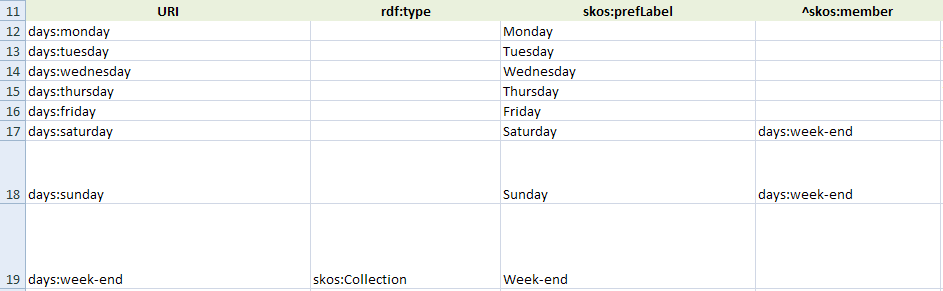
By default, each line in the body generates an instance of skos:Concept. If you need to generate instances of skos:Collection (or other classes, by the way), do the following :- Add a column with the title
rdf:type; - Add a column with the title
^skos:member; note the '^' character at the beginning of the column name; this tells the converter to generate the corresponding property (here, skos:member) from the value given in the cell to the URI of the resource generated for this row; - On the row corresponding to the collection, specify
skos:Collectionin therdf:typecolumn; for rows corresponding to skos:Concept, you can leave this column empty or specify skos:Concept explicitely if you want; - On each row of skos:Concept that belongs to the collection, enter the collection URI in the
^skos:membercolumn;
Dealing with skos:OrderedCollection and rdf:Lists
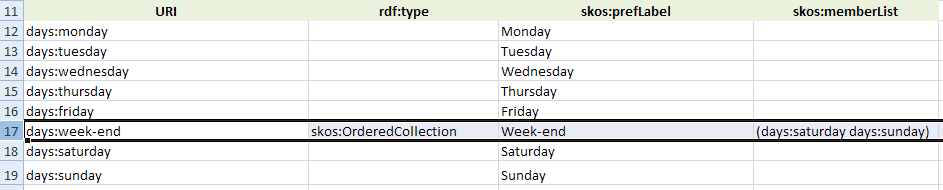
If you need to deal with skos:OrderedCollection, do the following :- Add a column with the title
rdf:type; - Add a column with the title
skos:memberList; - On the row corresponding to the ordered collection, specify
skos:OrderedCollectionin therdf:typecolumn; for rows corresponding to skos:Concept, you can leave this column empty or specify skos:Concept explicitely if you want; - On the row corresponding to the ordered collection, in the
skos:memberListcolumn, write the list of values like you would do in the Turtle, that is :- Put the whole list between parenthesis;
- Separate each value with a whitespace character;
Default SKOS post-processings
After each line in the body has been converted, the following SKOS post-processings are applied :-
skos:inScheme : a
skos:inScheme is added to every instance of skos:Concept and skos:Collection, with the value of the ConceptScheme given in cell B1;
skos:broader and skos narrower inverse : the inverse of skos:broader and skos:narrower are automatically added;
skos:hasTopConcept and skos:topConceptOf : every skos:Concept without skos:broader or not referenced by a skos:narrower is given a skos:topConceptOf
and its inverse skos:hasTopConcept;
SKOS-XL generation : if requested by the corresponding parameter, labels are turned into SKOS-XL;
Generating plain RDF (not SKOS)
The converter can actually generate other RDF vocabularies than SKOS. For this :- Add an
rdf:typecolumn to your data, and specify an explicit rdf:type for each row. Each row not having an explicit rdf:type will be considered a skos:Concept; - Make sure you still declare a URI in cell B1, this will be the URI of the named graph in which the data will be generated; note that to see this named graph in the output, you need to select an RDF format that supports named graphs (NQuads or TriG);
- If you declare metadata in the header, these will be interpreted as metadata of the named graph;

Advanced features
Changing Subject Column
By default, the property in each column is expressed on the subject URI of the first column of the spreadsheet. It is possible to state that a given column is expressed on a subject URI in a different column on the table. To do this, add a column parametersubjectColumn with a reference to the column letter containing the URI of the subject.
For example schema:name(subjectColumn="N") means this column is the name of the URI stored in column N.
This is how such a header could look like :

Blank nodes
Blank nodes with [...]
The converter understands the blank node syntax with "[...]" : simply put a cell value between square brackets and write the blank node data inside like you would do in a Turtle file. This can be useful to generate references to reified SKOS definitions or SKOS-XL Labels. For example, if a cell with titleskos:definition contains the following value :[ rdf:value "Definition blah blah"; dcterms:created "2017-02-21"^^xsd:date ], then a reference to a blank node will be created. You need to use the prefixes defined in the file in your
blank node content. The blank node is parsed exactly as a piece of Turtle, so it can contain any piece of valid Turtle syntax. If anything goes wrong during the parsing, the converter
will generate a Literal with the cell content instead.
Blank nodes with _:
If a cell value starts with _:, then it is interpreted as a blank node identifier. This allow to refer to that blank node as the subject of other triples using the subjectColumn parameter of the header of another column.
This is how it would look like : This would create
 ex:TEST ex:value [ rdfs:label "the label"@en ]
RDF Lists
RDF lists with (...)
The converter understands the RDF lists syntax with "(...)" : simply put a cell value between parenthesis and write the list items inside like you would do in a Turtle file :(ex:concept1 ex:concept2 ex:concept3). You need to use the prefixes defined in the file in your list content. The list is parsed exactly as a piece of Turtle;
if anything goes wrong during the parsing, the converter will generate a Literal with the cell content instead.
RDF lists with the asList = "true" parameter
Apart from the ability to create lists using the "(...)" Turtle syntax, it is also possible to instruct the converter to turn all values of a single column on the same subject into an RDF list.
For example the following sample file :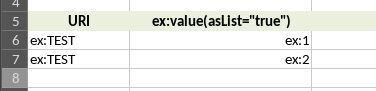 Will generate
 ex:TEST ex:value (ex:1 ex:2) instead of ex:TEST ex:value ex:1, ex:2
Lookups and reconciliation
Referring to URIs using their labels
SKOS involves creating hierarchies of concepts, and connecting related concepts. This involves making references to other concept URIs, typically in a columnskos:broader. But URIs can be opaque, and copy-pasting concept URIs across cells can be tedious. The lookupColumn parameter is a mechanism
that allows you to reference a concept URI through one of its label (or other unique key) stored in another column. To use it, add a column parameter
lookupColumn with a reference to the column in which the string value of this column will be searched. The reference can be either a reference to the
Excel column letter or to the corresponding property in which you want to lookup. A typical example is skos:broader(lookupColumn=skos:prefLabel),
which means that you want to create a skos:broader having as a value the URI of the Concept that have in its skos:prefLabel column the value you indicate
in your skos:broader column.
This is how it would look like, have a look at example 8 in the included examples :
 You can view the
 lookupColumn parameter as the equivalent of Excel "VLOOKUP" / "RECHERCHEV" function, except easier to write.
Reconcile / lookup values in other sheets
ThelookupColumn parameter described above works only to search for a URI within the same sheet. It may be the case that you would like to create a link
to an entity that is defined in another sheet of the same file. In that case :
- use the
reconcile="local"column parameter in the column that contains the label of the entity you want to search for. - use the additional
reconcileOn="http://..."column parameter to restrict the reconciliation either on the rdf:type or the skos:inScheme of the values you would like to search for.
reconcile
parameter.
The reconciliation is done on the following properties :
rdfs:labelskos:prefLabelskos:altLabelskos:notationfoaf:namedct:titledc:titledct:identifierdc:identifierschema:name

Support for OWL Manchester Syntax class expressions
What is it ?
The Manchester Syntax is a [quote]user-friendly[/quote] way of serializing OWL ontologies. Well, at least more user-friendly than RDF/XML (what could be *less* user-friendly ?). In particular it has this nice class expression syntax that we all know if we use Protégé, with keywordssome, only, and, or, parenthesis, etc. These class expressions, if you want to produce them by stating the corresponding triples, turn out to be
horribly difficult to produce.
That's why this Excel converter integrates the OWLAPI to benefit from its
OWL Manchester syntax parser, in order to be able to parse class expressions like :x some :A and not(:y some :B), and get the corresponding triples out.
This is useful to create and maintain full-fledged OWL ontologies in Excel tables.
How to use it ?
Append(manchester="true") to the property declaration in the title row (which would typically be owl:equivalentClass or rdfs:subClassOf if you are editing an OWL ontology),
in order to instruct the converter to actually parse the cells of this column using the Manchester syntax parser.
Make sure you use prefixed URIs in your class expressions, using any the prefixes known in your spreadsheet.
This is how it looks like: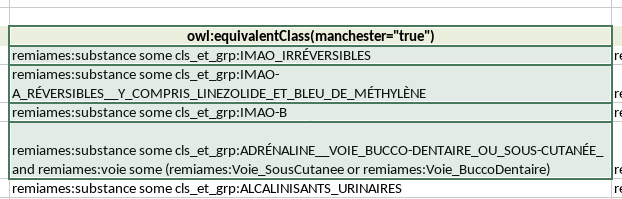
Specific support for SHACL logical operators
SHACL logical operators, typically sh:or, require a cumbersome RDF structure. xls2rdf provide specific wrapper to enable to easily turn a list of values in a column to the corresponding SHACL logical operator (typically sh:or, or sh:and or sh:xone). to do this add the parameterwrapper="sh:or" (or wrapper="sh:and" or wrapper="sh:xone") to your header, combining it with a separator="x" parameter.
This is how it looks like: The above example will output the single triple
 ex sh:class <http://exemple.fr/1> if "http://exemple.fr/1" is the only value in the value, but will output the following if there is the 2 values "http://exemple.fr/1" and "http://exemple.fr/2" in the cell:
					ex sh:or (
						[sh:class <http://exemple.fr/1>]
						[sh:class <http://exemple.fr/2>]
					)
Miscellaneous features
Named graph management
The converter actually puts all the triples generated in one sheet in a graph with the URI in cell B1. This is usually the same URI as the URI of the ConceptScheme; but in case of processing generic RDF data, this cell B1 can be used to indicate the URI of the graph, with its associated metadata in the header.Disabling cell conversion with a strikethrough
When working on a file, if you are unsure about the conversion of a certain cell but you don't want to delete the value, use a Ignore values in parenthesis
Add parameterignoreIfParenthesis="true" to the column header parameters to ignore the values if they are between parenthesis. This can be combined with a separator, e.g.
skos:broader(separator=";" ignoreIfParenthesis="true"). In this case, if the cell value is "pollution;(water pollution)" then water pollution will be ignored.
This can be used to maintain temporary values in the spreadsheet, waiting for further validation.
Copy the content of a column in another predicated
Add parametercopyTo="anotherPredicate" to copy the content of the column to another predicate, without having to duplicate the column. e.g.
skos:prefLabel@fr(copyTo="rdfs:label").
This is useful to set 2 predicates to the same value without having to duplicate the column. This does not work if the value is a blank node or a list.
Don't normalize whitespaces
Add parameternormalize-space="false" so that the whitespaces in the value are not normalized. This is useful if you want to preserve whitespaces such as in Markdown text.
dcterms:description@fr(normalize-space="false").
Base IRI
If a cell value starts with< and ends with > then it is interpreted as an IRI, relative to the IRI declared in the BASE declaration in the header (see above). This enables you to write relative IRIs, e.g. <images/myImage.png>
Default prefixes known in the converter
This is the list of known prefixes in the converter. You don't have to declare them in the header.Column header parameters reference
asList="true"indicate that all values of this column that are expressed on the same subject should instead be put in an RDF List. Instead ofex:A ex:p ex:1, ex:2, ex:3this would generateex:A ex:p (ex:1 ex:2 ex:3). Note that the order of items is **not** garanteed.copyTo="another predicate"Copy the value of this column into another predicate. Useful to set e.g.skos:prefLabelandrdfs:labelto the same value in a single column, orrdf:type+wdt:P31.id="theLabel": specifies the columnId to be used as a reference in subjectColumn or lookupColumn parametersignoreIf="xxx"indicate that the value xxx should be ignored when present in this columnignoreIfParenthesis="true"whether to ignore the values if they are in parenthesislookupColumn="skos:prefLabel"orlookupColumn="columnId"orlookupColumn="C": specifies the column to lookup the literal values to be converted to URIsmanchester="true": Indicate that the values of this column should be parsed as Manchester OWL syntax class expressionsnormalize-space="false": Indicate we don't want any whitespace normalization. Set this to "false" in case the value is a markdown text to be processed as Markdown.reconcile="local"orreconcile="external": whether to reconcile the value either locally or to an external reconcile endpoint (not implemented yet)separator=";": specifies the separator to split cell in multiple valuessubjectColumn="dcterms:creator"orsubjectColumn="columnId"orsubjectColumn="C": specifies the column containing the URI of the subject for predicates generated from this columnwrapper="sh:or"orwrapper="sh:and"orwrapper="sh:xone": instruct the converter to wrap the list of values of the cell into a SHACL sh:or operator

